-->
-->
-->
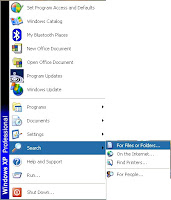
Step 1 -
Click on the green "
start" icon at the bottom left corner of your monitor screen.
Step 2 -
Move the cursor over the "
Search" icon and
click on the "
For Files and Folders" icon.
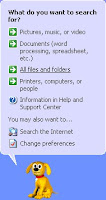
Step 3 -
Click on the "
All files and folders" icon.
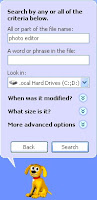
Step 4 -
Key in "
Photo editor" onto the first blank or fill and
click "
Search".
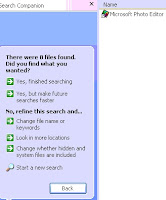
Step 5 - Once you find the software, drag it to the desktop as shortcut.
Step 6 - Double click on the icon at the desktop to use the software.


 -->
--> -->
--> -->
-->


